Your first work item
This walks through starting Kraft, connecting a repo, running a work item end
to end, and approving the gates that stand in its way. Steps 1 to 5, on the
quick-task chain, take about fifteen minutes, most of it spent waiting on an
agent. Steps 6 and 7 run the default chain to a merged pull request, which
takes longer in wall-clock time: it waits on your approvals, on CI, and on the
forge.
Before you start, you need:
- Kraft installed. See Install.
- A git repo to work on, with a test command Kraft can find. Kraft looks at
the repo root for, in order: a
justfilewith atestrecipe (just test),pyproject.toml(uv run pytest -q),package.json(npm test),Cargo.toml(cargo test), orgo.mod(go test ./...). A repo with none of these connects disabled, and no work item runs on it until you settest_commandin itsrepos.yamlentry and enable it. - A committed
.gitignorein that repo covering build output and caches (__pycache__/,node_modules/,target/and the like). After each agent task, Kraft commits every file the agent left in the worktree that git does not ignore, so without one, running the tests is enough to put their byproducts on the item's branch. - Claude Code, installed and logged in: the shipped chains run on it. See Harnesses for the other agents Kraft can drive.
- Kraft registered with Claude Code: the plugin, or
kraft admin init. See Connect your agent. - For steps 6 and 7: a GitHub or GitLab remote on the repo, with
ghorglablogged in. Kraft opens and merges the merge request through it. Steps 1 to 5 work without one. Thedefaultchain also expects:- CI that runs on pull requests. Kraft waits for the merge request's
checks to pass. On GitHub, a pull request with no checks at all reads as
"no checks yet" and stays pending, so
merge_request_feedbackwaits until its 90-minute cap and then stops for you. A repo with no CI can setci_checks: falseon its entry inrepos.yamlto skip both CI waits, before and after the merge. - A review rule only if you can meet it.
external_approvalwaits while a branch rule requires an approving review. GitHub does not let you approve your own pull request, so on a solo repo with such a rule it waits until you remove the rule or someone else approves. With no such rule it passes straight away, so a solo developer needs nothing here.
- CI that runs on pull requests. Kraft waits for the merge request's
checks to pass. On GitHub, a pull request with no checks at all reads as
"no checks yet" and stays pending, so
/kraft:onboard. Steps 3 to 7 have slash commands as well:
/kraft:handoff to file work, /kraft:board to see it, /kraft:gates to
approve. See Agent integration.1. Start the server
kraft
Leave that running. It is the server, in the foreground, on
http://127.0.0.1:8765. Open that URL; you should see an empty board.
Open a second terminal for everything that follows.
2. Connect a repo
Connect it from your coding agent, or from a terminal.
From your agent (recommended)
In Claude Code, install the Kraft plugin and open a session in the repo you want Kraft to work on:
claude plugin marketplace add itsOmidKarami/kraft
claude plugin install kraft@kraft
cd ~/code/my-project
claude
Then, in the session:
/kraft:onboard
Follow what it asks. It connects the repo and makes sure Kraft knows how to set it up and run its tests, so your first work item doesn't stop on a wrong guess.
The plugin also registers Kraft's MCP server with Claude Code, so there is no
kraft admin init step on this path. For other agents, or to set it up without
the plugin, see Connect your agent.
From a terminal
Without the plugin, register Kraft with Claude Code once, then connect the repo from inside it:
kraft admin init   # once per machine; required without the plugin
cd ~/code/my-project
kraft repo connect
Kraft reads the repo's files (a justfile, a package.json, a
pyproject.toml) to guess two commands: how to prepare a fresh checkout
(setup_command) and how to run the tests (test_command). It prints the test
and setup commands it found, and says so when it saved the repo disabled
because it found no test command. Check both in Settings, then Repos (or in
~/.kraft/templates/repos.yaml) before you trust them. If the repo needs no
preparation, set setup_command: "". See
Repos for every field.
Confirm the repo is connected:
kraft repo list # a * marks the repo you are in
3. File your first work item
The quick-task chain has no gates, which makes it good for confirming the
pipes are connected:
kraft item create "fix the flaky import test" --chain quick-task \
  --description "It's the datetime import, not the fixture."
It prints the new item. Copy its id:
id            9d0ab38ff3c9439b90506df0f6966660   <- the ID
status        paused
title         fix the flaky import test
bead_warning  bd is not installed: [Errno 2] No such file or directory: 'bd'
You can list IDs again any time with kraft view list.
bead_warning: bd is not installed means Kraft could not file a matching
beads issue. Beads is optional; the work
item is filed and runs the same without it, so you can ignore the line.
The item lands paused, because item create starts nothing unless you add
--autostart. Nothing has spent a token yet. See Work item.
4. Start it, and watch
Every command below takes the item's ID. Replace ID with the one you copied.
You can leave the ID off only when you run the command inside that item's
worktree.
kraft item resume ID   # the CLI twin of clicking Start on the board
kraft view watch       # a live board, redrawn on every event
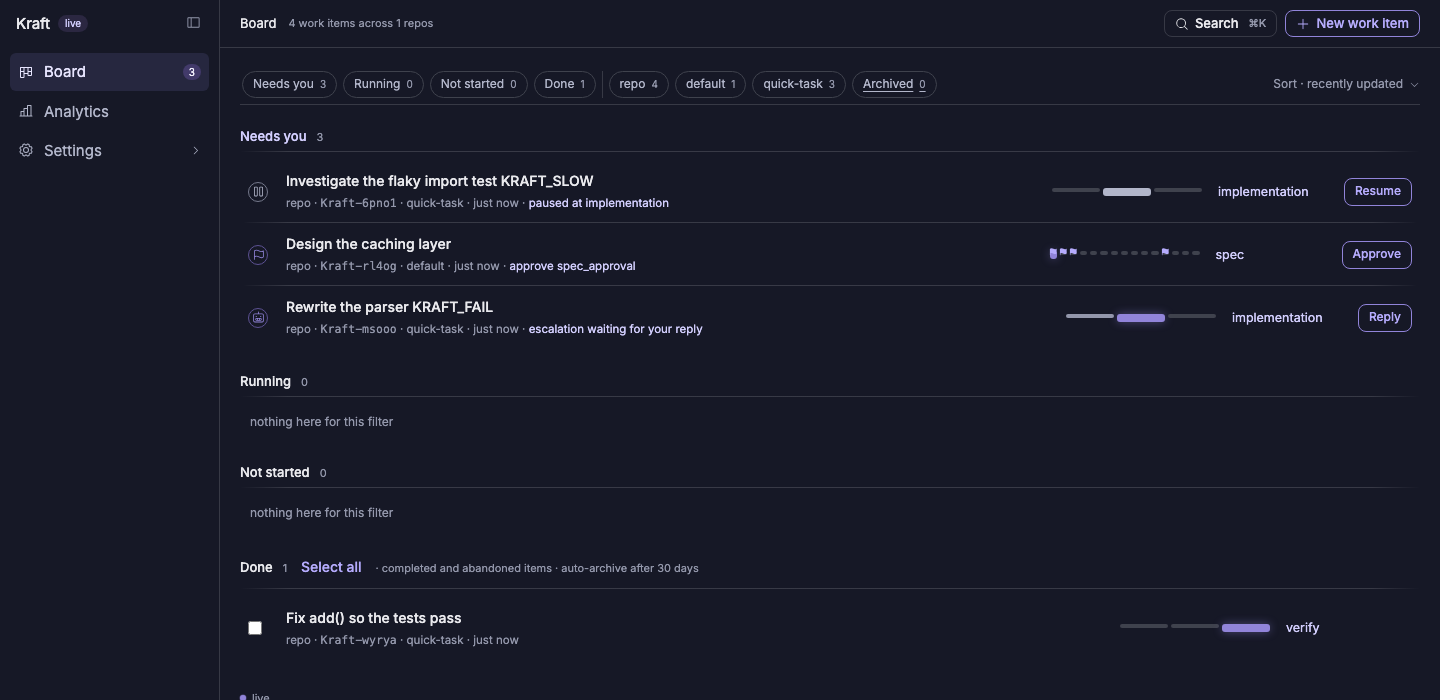
quick-task runs implementation, then verify, with no gate. If the agent's
fix is good, the item reaches Done on its own. verify runs the repo's own
test_scopes or test_command from repos.yaml. If it fails, the item stops
for you with the failing scope named.
You know it worked when the board shows the item under Done.
5. Where is my change?
quick-task opens no pull request: the change stays on the item's own branch,
in its worktree. To see it:
kraft view diff ID     # the change, against the base branch
kraft repo path ID     # the worktree's path; cd "$(kraft repo path ID)" to go there
kraft repo open ID     # open the worktree in your editor
Merge the branch yourself, or run the next piece of work on default, which
opens and merges a pull request for you.
6. Try the real chain, and its gates
default opens and merges a pull request, so check the forge first.
kraft admin doctor fails its forge row if gh or glab is missing, and
gh auth status (or glab auth status) confirms you are logged in:
kraft admin doctor
gh auth status
default is the chain most work runs on, and the default for --chain, so you
can leave the flag off:
kraft item create "add a --dry-run flag to the sync command"
kraft item resume ID   # use the new item's ID, not the first one
Before any code is written it stops at three gates, one after another:
spec_approval, then plan_approval, then chain_revision_approval. The last
is about the chain itself: an agent checks the approved spec and plan against
the nodes still to run and proposes changes to them, and when it proposes none,
which is usual, the gate passes without asking you. Each gate shows up under
Needs you on the board:
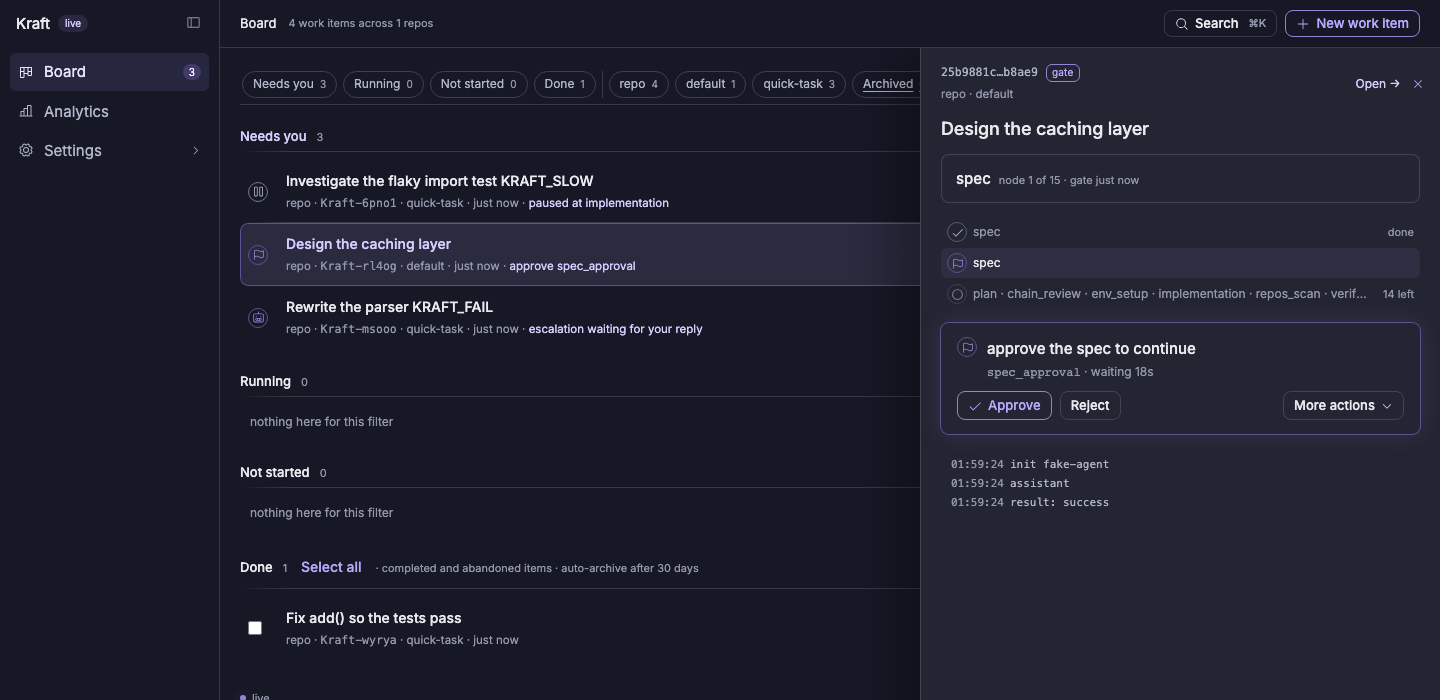
kraft view artifact ID     # read the document the gate is about
kraft item approve ID      # or Approve on the board
To send it back instead, run kraft item reject ID --note "...". The node that
wrote the document runs again with your note.
You know it worked when, after your last approval, the item moves out of Needs you and into Running, and the board shows implementation started.
7. Review before it merges
After implementation and verification, the item stops at local_review, and
later at final_review. Each comes with a diff to read first:
kraft view diff ID --stat   # how big it is
kraft view diff ID          # the full diff
Approve local_review and Kraft opens a draft merge request and runs CI and
automated review on it. Approve final_review and it marks the request ready,
waits for the merge request's external approval on your forge, then merges.
kraft item approve ID   # at each gate, once you have read the diff
kraft view list         # shows the item's status
You know it worked when the item's status is completed and the merge request
shows as merged on your forge.
What each gate does, and how caps and waits bound the chain, is in Concepts.
Troubleshooting
An item stopped and you don't know why. Start with the item, then its agent's log, then the install:
kraft view show ID     # status, the node it stopped at, and the reason
kraft view logs ID     # the agent session's own log
kraft admin doctor     # every install check at once
In Claude Code, /kraft:triage does this for you and offers to retry, raise a
cap, or hand the item back to you. Troubleshooting
maps every stop reason to its fix. The rest of this section covers what a first
run most often hits.
It stops at implementation having spent 0 tokens. Nothing registers
Kraft's MCP server with Claude Code, so Kraft refused to launch the worker.
kraft view logs ID says so and names the fix: install the Kraft plugin, or
run kraft admin init. Then run kraft item retry ID. kraft admin doctor's
mcp server row checks the same thing.
claude is not on PATH. kraft admin doctor fails its agent: claude
row. The server looks the command up on its own PATH, which under a service
can differ from your shell's. Install Claude Code, make sure claude runs from
the shell that starts kraft, then restart it with kraft admin restart.
It stops at a forge node: no forge is recorded. The repo had no GitHub or
GitLab origin when you connected it. Set forge: github or forge: gitlab on
it in Settings, then Repos (or in repos.yaml), then kraft item retry ID.
It waits on "no checks yet", or external_approval keeps waiting. See
Waiting on CI or a review.
It stops with "budget cap reached". The item, or the day's work across
every item, spent its budget: budget.work_item_usd and budget.daily_usd in
policy.yaml, $10 and $50 by default. Raise the cap, then
kraft item retry ID. See Caps and budgets.
The first item stops at verify with a config error. The repo declares
neither test_scopes nor test_command in repos.yaml, and Kraft will not
guess a test command. Set one, then run kraft item retry ID.
The first item stops before it starts. A repo with no setup_command stops
its first work item rather than guessing what to run in a fresh worktree. Set it
in repos.yaml, then run kraft item retry ID.
Next: run it as a service
kraft in a terminal stops when you close it. To keep the server running in
the background and start it at login:
kraft admin install-service
Where to go from here
- Concepts: the vocabulary this walkthrough used: work item, chain, node, task, gate, cap.
- How a work item runs: what happened between filing and merge, and every status an item can hold.
- Configuration: every field in
library.yaml,repos.yaml,policy.yaml,access.yaml. - Agent integration: doing all of the above from inside a coding-agent session instead of this shell.
- Remote access: approving a gate from your phone.