How a work item runs
This page follows one work item from the moment you file it to the moment it is archived. It uses the words defined in Vocabulary.
From filing to archive
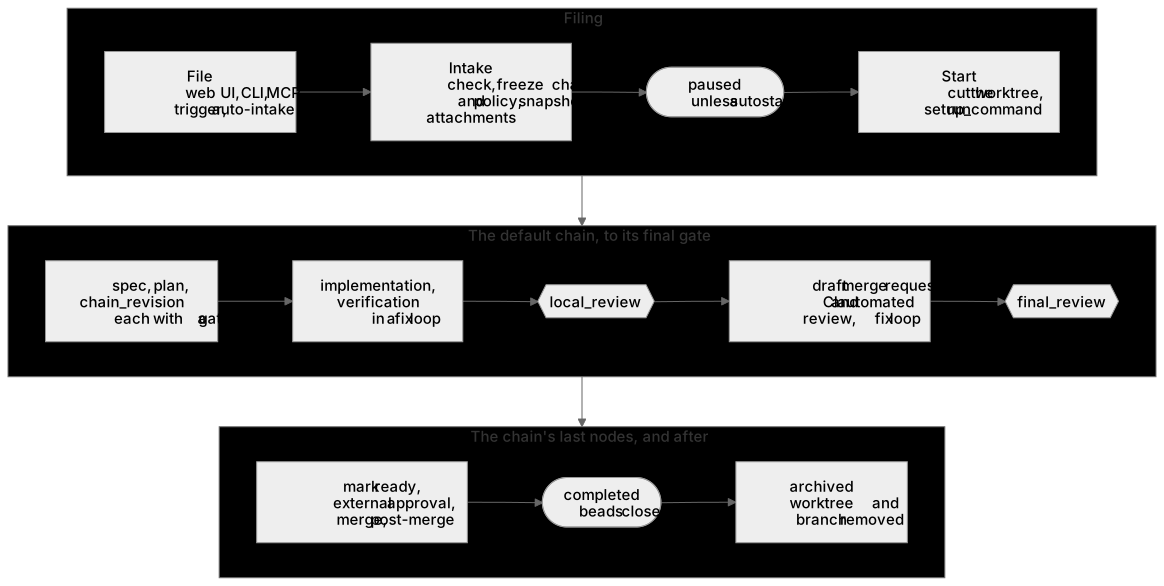
- Filing. You file an item from the web UI,
kraft item create, or an agent over MCP. A trigger files one too, and so does auto-intake, which picks up ready beads when you turn it on. - Intake. Kraft checks the repo, the base branch, the chain and the policy, then freezes the chain and policy onto the item and copies any attached spec or plan. A later edit to a chain file changes nothing for this item.
- Paused. A filed item waits, paused, until a person starts it. Nothing
has run and nothing has been spent.
--autostartfrom a person starts it at once. Auto-intake starts what it files, but only on a chain with at least one gate. - Start.
kraft item resume(the Start button) claims the item. Before the first node runs, Kraft cuts a git worktree for it from the base branch, on its own branch, copies the attached documents in, and runs the repo'ssetup_command. If a linked bead is still blocked by another bead, the item goes back to paused instead. A workspace item's members are cut the same way, each as a worktree of its own connected repository, on a branch of the same name. - The chain. Kraft walks the nodes in order. An exec node runs its tasks.
A gate node stops the item until a person decides. In the shipped
defaultchain that means a spec, a plan and a chain revision, each with its gate; implementation and verification in a fix loop; thelocal_reviewgate; a draft merge request with CI and automated review; and thefinal_reviewgate. - Landing. The chain's last nodes mark the merge request ready, wait for an approving review if the forge requires one, merge it, and wait for the post-merge pipeline.
- Completed. When the last node finishes, the item is
completedand Kraft closes the beads it implements. - Archived. Archiving removes the worktree and the branch and takes the
item off the board. You archive by hand, or set
archive.after_daysinpolicy.yamlto archive ended items automatically. The record of what happened stays. For a workspace item it removes each member's worktree and branch from its connected repository too.
Statuses
A work item always holds one of seven statuses. Five are open and two are ended. An ended item never runs again.
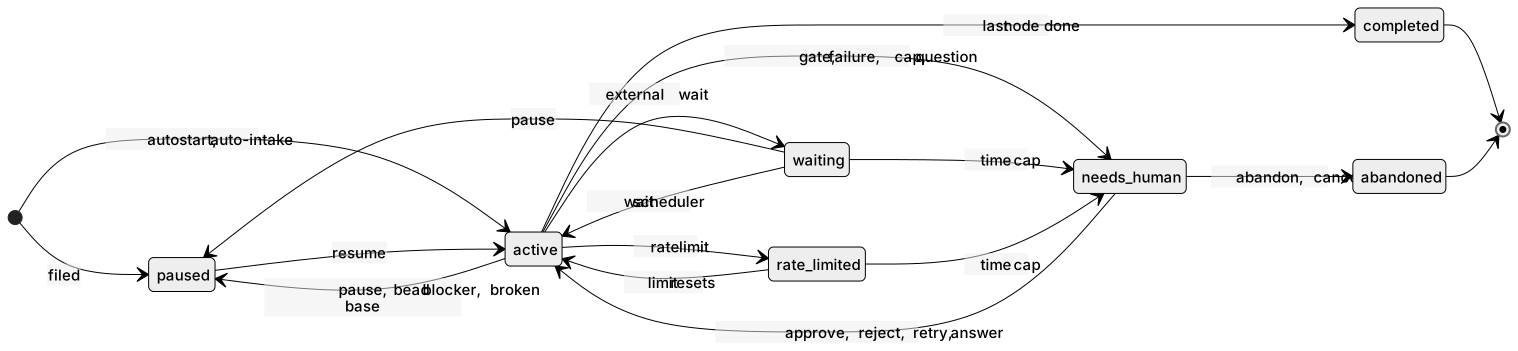
The diagram shows the usual paths. complete and cancel can end an item
from any open status, and abandon from any status but active; the second
table below lists every move.
| Status | What it means | The board shows it under |
|---|---|---|
paused | Filed and not started, or stopped by a person. Nothing runs. | Not started if it never ran, else Needs you |
active | A walk is running a node. It takes one of the max_concurrent slots. | Running |
waiting | Parked on something outside Kraft: CI, an automated review, an approval, a merge landing. It holds no slot. | Running |
rate_limited | The agent hit its provider's rate limit. Kraft starts it again when the limit resets, with no one paged. | Running |
needs_human | Stopped at a gate, or stopped for a person by a failure, a cap, or an agent's question. | Needs you, or Running while an escalation turn works on it |
completed | Ran to the end of its chain, or a person marked it complete. | Done |
abandoned | A person cancelled or abandoned it. | Done |
What moves an item between them:
| From | To | Cause |
|---|---|---|
| filed | paused | Every item, unless a person asked for --autostart. |
| filed | active | --autostart, or auto-intake. |
paused | active | kraft item resume, with an optional steer. |
active, waiting | paused | kraft item pause. Kraft also pauses an item itself when a linked bead is blocked, or when the base branch it sits on turns red after another item's merge. |
active | waiting | A task started an external wait. |
waiting | active | The wait scheduler looks again when its next check is due. |
active | rate_limited | An agent launch was rate limited and no fallback was left. |
rate_limited | active | The limit's reset time passed. |
active | needs_human | A gate; a task that failed after recovery and the fix loop; a fix loop, time or budget cap; a wait that timed out; a config error; an agent's question. |
waiting, rate_limited | needs_human | A time cap ran out while the item was parked. |
needs_human | active | kraft item approve or reject at a gate; kraft item retry after a stop; kraft item resume --steer to answer an agent's question; an escalation turn that retries the item. |
active, waiting, paused, needs_human | active | kraft item skip, which moves past the current node or gate. |
active | completed | The last node finished. |
| any open status | completed | kraft item complete --reason. |
| any open status | abandoned | kraft item cancel --reason. It keeps the worktree until you archive. |
any status but active | abandoned | kraft item abandon. It removes the worktree and branch at once. Pause an active item first. |
kraft item retry is the only way back onto an item that a failure stopped,
and it only works from needs_human. resume only works from paused, apart
from answering a question. A reject that has already hit its gate's reject
limit leaves the item in needs_human.
Displayed status
The stored status set above is unchanged. On top of it, GET /work-items and
GET /work-items/{id} report display_status, computed when read from the
stored status, the item's stop_kind, a pending gate and whether an
escalation has run since the item stopped. It is exactly one of nine values:
display_status | When |
|---|---|
archived | archived_at is set, whatever the stored status |
done | completed |
cancelled | abandoned |
paused | paused, including an item that has not started (current_node_id is null) |
running | active |
waiting | waiting or rate_limited: something outside Kraft will come back by itself |
needs_you | needs_human with a gate pending, or a stop no rule below claims |
escalated | needs_human, no gate pending, and an escalation has run since this stop began |
failed | needs_human, no gate pending, no escalation, and stop_kind is failed, config or infra |
The rows are checked top to bottom. A stop recorded before stop_kind existed
has no kind and reads needs_you. A stuck stop that automatic escalation is
counting down to reads needs_you until the escalation starts, then
escalated.
infra reads as failed rather than needs_you because nothing will change
it on its own: no handler applies, and no timer or escalation will make a
different answer come back. A daemon restart that lost a session, a worktree
refresh that git refused, CI infrastructure that ran out of retries and a
forge that refused the merge request three times are all infra stops. The
way out is a person fixing the cause and retrying.
MR closed externally
An item parked waiting or needs_human at a merge-request node can have its
merge request closed on the forge by someone, or something, other than Kraft
-- closed, not merged. A poller checks every such item against the forge on a
fixed interval (policy.forge_poll_s, default 300s) and, when it finds the
merge request closed, stops the item with stop.kind: "mr_closed" and
facts: {ref, url} naming it.
There are three ways out, and no fourth: reopen the same merge request
(POST /work-items/{id}/reopen-mr), which reopens it on the forge and retries
the stopped node, exactly as POST /retry with no path would; retry from
the MR node with its path, which opens a fresh merge request instead of
reusing the closed one; or cancel the item, which leaves the closed merge
request and the worktree as they are.
Inside a node
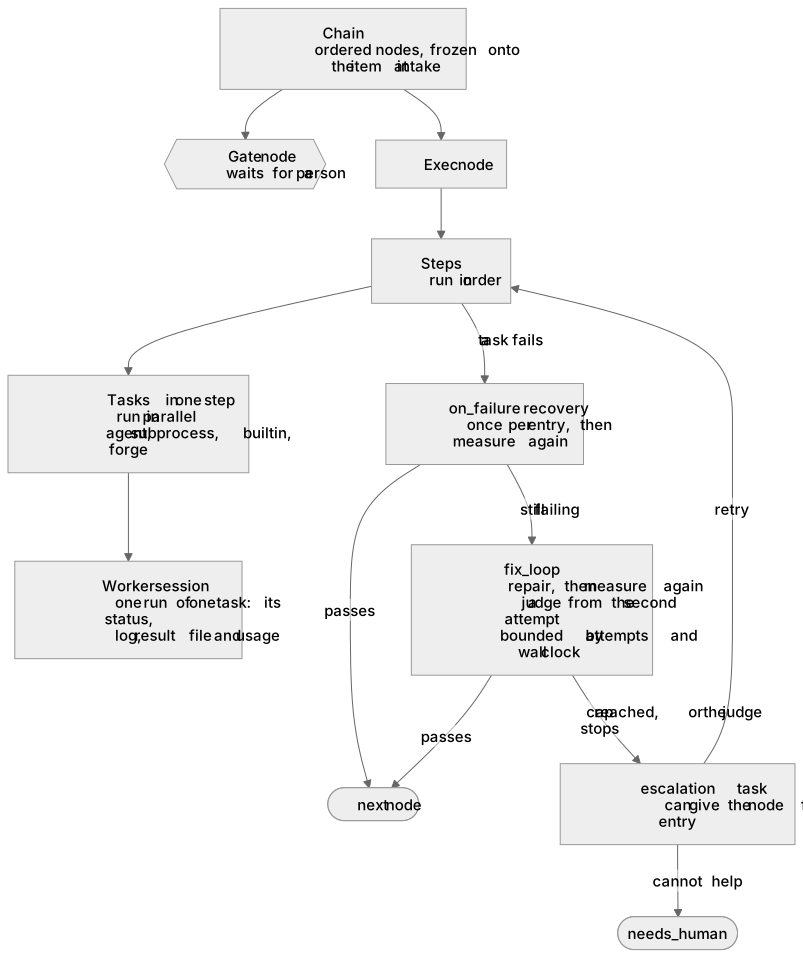
A chain is a list of nodes. A gate node waits for a person. An
exec node runs steps in order, and the tasks in one step in
parallel. Each run of a task is a worker session: a row with its status,
log, result file, tokens and cost. An agent or subprocess task launches a
process for it. A builtin or forge task runs inside Kraft. kraft view logs
reads a session's log.
When a task fails, a node can try three things, in this order. Each is optional, and each is declared on the node in its chain file (see Chain nodes).
- Recovery (
on_failure) runs repair steps once per entry into the node, then runs the whole node again. It is for a problem outside the code, such as a label to fix on the merge request. - The fix loop (
fix_loop) hands the failure to a repair agent, then measures the whole node again, from its first step. From the second attempt on, a judge agent decides whether the attempts are still converging. The loop ends at its attempt limit or its wall clock, or when the judge stops it. See Fix loop and judge. - Escalation (
escalation) runs once the node is stuck. If it succeeds, the node gets a fresh entry from its first step. If it does not, the item stops for a person.
Some stops skip all three and go straight to a person: a config error, a
budget or time cap, an infrastructure failure, a wait timeout, and an agent's
question. No repair task can fix those. A rate limit does not stop for a
person at all; it parks the item as rate_limited.
A node with no escalation of its own gets a generic one instead. When it
stops stuck, and auto_escalate_stuck is on in policy.yaml (the default),
Kraft starts an escalation turn: an agent that reads the stopped item and
may retry it. It answers only stuck stops, never the ones listed above, and at
most auto_escalate_stuck_cap times. You can also start or
continue one yourself with kraft item escalate. The
Security page lists what an escalation
turn is allowed to do.
Steering
A steer is a note to the next agent Kraft launches for this item. It is used once, by the first agent task that runs, and then dropped. There is no channel into an agent that is already running, so a steer never reaches one. To redirect running work, pause it and resume it with a steer.
You give a steer in four ways:
kraft item resume ID --steer "..."reaches every paused agent task.--steer-task PATH=TEXTaddresses one task by its canonical path.kraft item retry ID --steer "..."goes into the prompt of the retried node.- Rejecting a gate with
--notesends the note, as a steer, to the node the gate sends the item back to. - Answering an agent's question:
kraft item resume ID --steer "..."on an item that stopped with one.
Kraft refuses a steer that no agent task would read, for example on a node that only runs a subprocess or waits on CI. It tells you so rather than dropping the text.
Review threads are the other way to give feedback. They carry line-level comments and stay until resolved. See Reviewing a change.
Where to go next
- Caps and budgets: the limits behind the
needs_humanstops above. - Chain nodes: the keys that declare steps, recovery, fix loops and escalation.
- Architecture: the process and modules that do all of this.